CAA Policy Explorer: Map Certificate Issuance Across Subdomains
There’s a quiet but critical corner of TLS security that most teams get wrong: CAA records. They’re hard to audit, easy to misconfigure, and nearly impossible to visualise across a large domain. Until now.
SSLBoard is launching the CAA Policy Explorer — the first feature that gives you a complete, live view of your organisation’s Certificate Authority Authorization policy, across every subdomain, in one place.
What Is a CAA Record?
CAA stands for Certificate Authority Authorization. It’s a DNS record type (defined in RFC 8659) that lets you declare which Certificate Authorities are allowed to issue TLS certificates for your domain.
Think of it as an allowlist baked into DNS. If your domain has a CAA record naming only letsencrypt.org, then DigiCert, Sectigo, and every other CA in the world is contractually and technically blocked from issuing certificates for that domain. Any CA that ignores your CAA record is in violation of the CA/Browser Forum Baseline Requirements.
CAA records support three property types:
issue— authorises a CA to issue standard certificatesissuewild— authorises a CA to issue wildcard certificates (takes precedence overissuefor wildcard requests)iodef— an email or URL where the CA should report policy violations
When no CAA record is set, any CA can issue — which is the default state for most organisations, and a significant attack surface.
Why CAA Records Matter
Mis-issued certificates are a real threat vector. A rogue certificate for your domain — issued by a CA you’ve never heard of — gives an attacker everything they need for a convincing phishing page or a man-in-the-middle attack, with a padlock in the browser bar and no visible warning to your users.
CAA records close that door. They were made mandatory for CAs to check as of September 8, 2017, when the CA/Browser Forum required all CAs to perform CAA lookups before every issuance. In 2024, Sectigo extended CAA enforcement to S/MIME certificates too.
But here’s the catch: the protection only works if your CAA records are correct. And getting them right at scale is genuinely hard.
The Problem With Managing CAA at Scale
For a domain with a handful of subdomains, setting up CAA records is a one-afternoon job. For an enterprise with dozens or hundreds of subdomains — each potentially using a different CA, different team, and different infrastructure — it becomes a sprawling, invisible mess.
Here’s what makes it difficult:
Inheritance is invisible. CAA records inherit downward through the DNS tree. A subdomain with no CAA record falls back to its parent, which falls back to its parent, all the way up to the apex domain. That sounds convenient until someone sets a CAA record on mail.example.com that accidentally blocks wildcard issuance for *.mail.example.com — something that’s nearly impossible to spot unless you check each level individually.
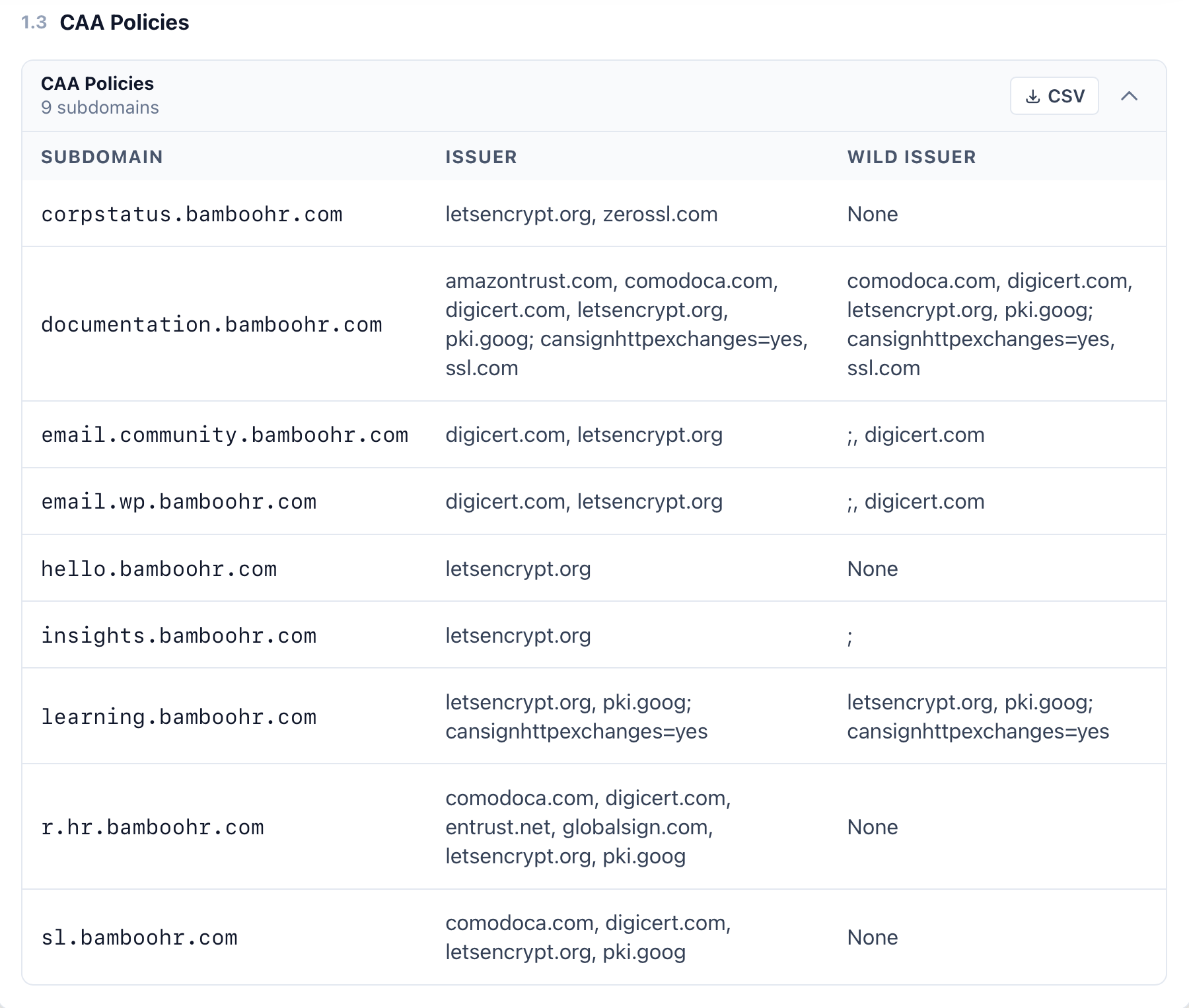
Wildcard vs standard issuance are different controls. The issue and issuewild tags are separate. A domain that authorises DigiCert to issue standard certificates might still block it from issuing wildcards. A semicolon ; as the issuer value — which appears in the BambooHR data above for email.community.bamboohr.com and insights.bamboohr.com — means no CA is permitted, which will silently block all renewals.
There’s no single source of truth. DNS tooling shows you a single record at a time. You can’t query “what is the effective CAA policy across all of my subdomains” — you’d have to enumerate every subdomain, walk up the DNS tree for each one, and interpret the inheritance rules manually.
Subdomains you didn’t know existed. Shadow IT, old deployments, acquired companies — organisations regularly have subdomains with active certificates they’ve never audited. You can’t set the right CAA policy for infrastructure you can’t see.
People turn to forums and support channels constantly when CAA bites them. Let’s Encrypt’s community forum is full of threads like “CAA record prevents issuance” and “manual renewal fails with CAA error yet record is OK”. AWS re:Post, DirectAdmin forums, and ZeroSSL’s help centre all have dedicated CAA troubleshooting articles. The errors are cryptic, the inheritance rules are non-obvious, and there has been no tool to give a complete top-down view.
How SSLBoard Solves This
SSLBoard’s CAA Policy Explorer combines two things that have never been put together before:
1. A complete subdomain inventory from Certificate Transparency
Every TLS certificate ever issued is logged in the public CT log infrastructure. SSLBoard ingests and indexes these logs continuously. That means when you query a domain, we already know every subdomain that has ever had a certificate issued for it — including subdomains you’ve forgotten about, acquired domains, and staging environments.
This inventory is far more complete than anything you’d get from DNS enumeration or internal documentation. It’s built from the actual issuance record.
2. Live CAA record lookups for every subdomain
For each subdomain in the inventory, SSLBoard performs a live DNS lookup to retrieve its CAA records — both at the subdomain level and at each parent level, modelling the exact inheritance chain that a CA would follow at the moment of issuance.
The result is what you see above: a policy table showing, for every subdomain, which CAs are authorised to issue standard certificates (ISSUER) and which are authorised to issue wildcards (WILD ISSUER). No guessing. No manual DNS spelunking. The full picture, automatically.
What the BambooHR Example Reveals
The screenshot above shows SSLBoard’s CAA Policy Explorer for bamboohr.com with 9 subdomains. A few things jump out immediately:
email.community.bamboohr.comhasissuewildset to; , digicert.com— the leading semicolon is a deliberate block on all CAs, followed by only DigiCert being authorised. This is a valid but unusual pattern that would be invisible without a dedicated tool.insights.bamboohr.comhas a wild issuer of just;— meaning no CA is authorised to issue wildcards for that subdomain. Any wildcard certificate request will fail.hello.bamboohr.comandcorpstatus.bamboohr.comhaveNonefor wild issuer — the policy relies entirely on inheritance from the parent domain.r.hr.bamboohr.comauthorises five different CAs for standard issuance — a mix of comodoca.com, digicert.com, entrust.net, globalsign.com, letsencrypt.org, and pki.goog — suggesting multiple teams or systems handling TLS for that subdomain.
Each of these entries is a potential point of confusion or misconfiguration. With the CAA Policy Explorer, they’re surfaced immediately.
A First-of-Its-Kind Feature
We searched extensively and found no existing tool that does this. The existing CAA tools on the market — from DNS providers, CA vendors, and security scanners — all operate on a single domain at a time. None of them combine a CT-derived subdomain inventory with a full CAA policy tree view.
SSLBoard’s CAA Policy Explorer is, to our knowledge, the first tool to do this automatically at scale.
It’s available now in every TLS/SSL report on SSLBoard. Run a report on your domain and find the CAA Policies section under the DNS analysis tab.
SSLBoard continuously indexes Certificate Transparency logs to give you the most complete picture of your TLS posture. The CAA Policy Explorer is part of our ongoing mission to make enterprise TLS management actually manageable.